# Restricting system textScaleFactor, when you have to
Source: https://iiro.dev/restricting-system-text-scale-factor/
Published: 2020-05-18
Learn how to restrict Flutter's system textScaleFactor when product or design constraints require it.
---
**note:** I received feedback pointing out that **if the user chooses a huge font, they need it**, and you should let them.
I agree.
However, **sometimes it's not up to you to decide**.
Or maybe something else is a bigger priority right now.
In those situations, you need to find a compromise.
Anything is better than locking `textScaleFactor` to a hardcoded value.
This article is written that scenario in mind.
Up until very recently, we were setting the `textScaleFactor` manually to `1.0` on every `Text` widget in Reflectly like this:
```dart
@override
Widget build(BuildContext context) {
return Column(
children: [
Text(
'something very important',
textScaleFactor: 1.0,
),
Text(
'something equally important',
textScaleFactor: 1.0,
),
],
);
}
```
What initially to me seemed like a very weird thing to do (_it defaults to `1.0` - why set it explicitly?_), proved to have some reasoning behind it.
It was there to ignore the system-wide text size settings.
The `textScaleFactor`, if unset, defaults to the value from the nearest `MediaQuery`.
The value for the `MediaQuery`, if not overridden, comes from device settings.
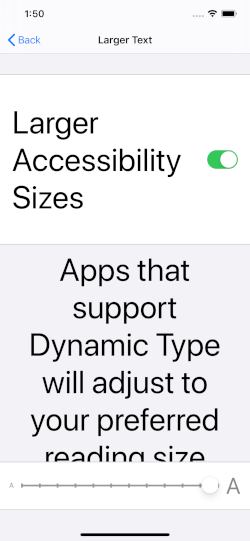
_Screenshot of iOS accessibility settings with text size set to maximum._
The `textScaleFactor` that comes from the device settings can be anywhere from `1.0` to some very large values.
If we go to the accessibility settings of our iDevice and choose the largest possible text size, Reflectly becomes quite unflattering:

_On the left, the main timeline page of Reflectly with normal text size. On the right, the same page with text size set to maximum settings._
Not very pretty, is it?
The hardcoded `textScaleFactors` for every single `Text` widget made at least some sense now.
## Providing a default textScaleFactor for a subtree
Setting `textScaleFactor` manually for every single `Text` widget is not a very scalable solution.
If we forget just one `Text` widget, it will stand out and make our UI look inconsistent.
The good news is that we can override `textScaleFactor` for an entire subtree:
```dart
@override
Widget build(BuildContext context) {
return WidgetsApp(
// ...
builder: (context, child) {
// Obtain the current media query information.
final mediaQueryData = MediaQuery.of(context);
return MediaQuery(
// Set the default textScaleFactor to 1.0 for
// the whole subtree.
data: mediaQueryData.copyWith(textScaleFactor: 1.0),
child: child!,
);
},
);
}
```
**note:** Although this entire article talks about `WidgetsApp`, it works exactly same with `MaterialApp` and `CupertinoApp`.
Now we don't need to provide `textScaleFactor` to our `Text` widgets anymore.
It means that this:
```dart
@override
Widget build(BuildContext context) {
return Text(
'Hello world!',
textScaleFactor: 1.0,
);
}
```
is exactly same as this:
```dart
@override
Widget build(BuildContext context) {
return Text('Hello world!');
}
```
No matter what the device text size is, our `Text` widgets will always ignore it and act as if the factor was always `1.0`.
Yay for ignoring a user preference without having to _repeat repeat ourselves ourselves_!
### How it works
Let's refer to a piece in [textScaleFactor documentation](https://api.flutter.dev/flutter/widgets/Text/textScaleFactor.html) for the `Text` widget:
> If null, will use the MediaQueryData.textScaleFactor **obtained from the ambient MediaQuery**.
We're making the nearest `MediaQuery` be the one where we set a default text scale factor.
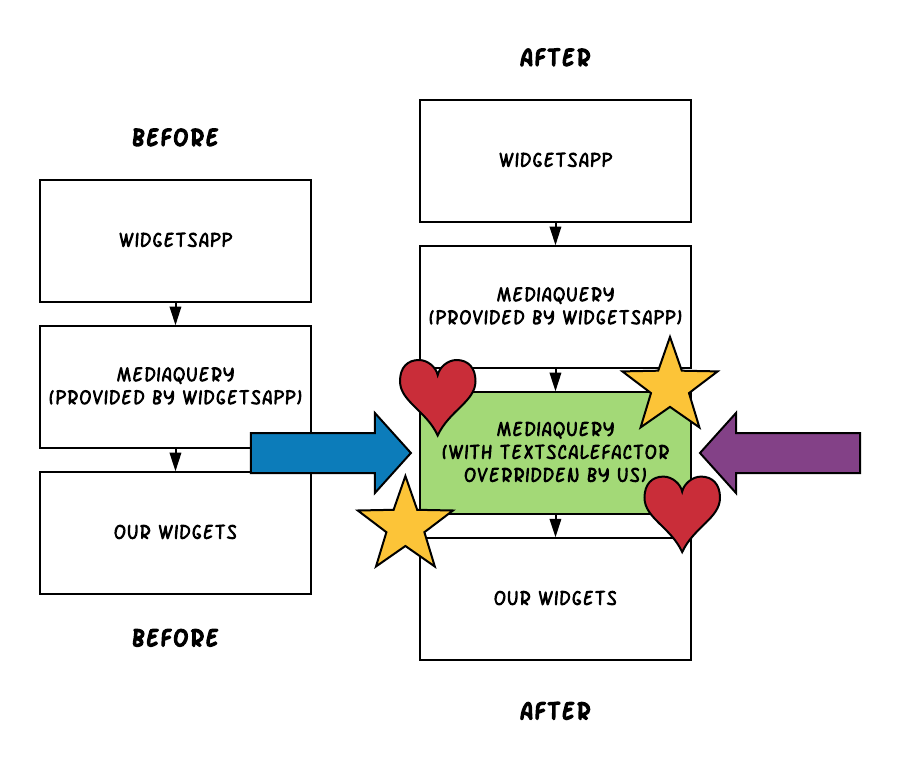
_A diagram that shows the rough difference between before and after, with some oomph to make the change more prominent._
Whenever a widget calls `MediaQuery.of(context)`, it will get our `MediaQuery` with the overridden `textScaleFactor`.
And that is what the `Text` widget will use when resolving the default `textScaleFactor`.
## Making it more adaptive
Setting the `textScaleFactor` to `1.0` and calling it a day means ignoring your users needs.
They're asking for a bigger text size and you're not delivering it.
On the other side of the argument you might have your designer or client.
They don't want the app to look ugly.
Or maybe some other feature/bug is more important right now, and you'll fix this later.
Like with anything else in life, there's a middle ground solution that pleases both:
```dart
@override
Widget build(BuildContext context) {
return WidgetsApp(
// ...
builder: (context, child) {
// Obtain the current media query information.
final mediaQueryData = MediaQuery.of(context);
// Take the textScaleFactor from system and make
// sure that it's no less than 1.0, but no more
// than 1.5.
final num constrainedTextScaleFactor =
mediaQueryData.textScaleFactor.clamp(1.0, 1.5);
return MediaQuery(
data: mediaQueryData.copyWith(
textScaleFactor: constrainedTextScaleFactor as double?,
),
child: child!,
);
},
);
}
```
Instead of a hardcoded `textScaleFactor`, this time we're providing a constrained system value.
By using `clamp()`, we're giving the system `textScaleFactor` a lower and upper bound.
This allows the users to control the text size without going completely overboard.
## Writing tests for it
> "There's nothing to test! It's just a couple lines of code!"
I thought so too, until we released this thing and Crashlytics started reporting about crashes in production.
Without going into details, believe me when I say it was a stupid mistake.
I fixed the bug with accompanying test cases that make sure it doesn't happen again.
Here's roughly how it works.
### Extracting the behavior to a widget
We don't care about other stuff in our `main.dart` - we only want to test the text scale factor logic.
The easiest way to do this is to extract the logic into a separate widget, and write tests for that widget.
We'll call it `TextScaleFactorClamper`:
```dart
class TextScaleFactorClamper extends StatelessWidget {
const TextScaleFactorClamper({required this.child});
final Widget child;
@override
Widget build(BuildContext context) {
final mediaQueryData = MediaQuery.of(context);
final num constrainedTextScaleFactor =
mediaQueryData.textScaleFactor.clamp(1.0, 1.5);
return MediaQuery(
data: mediaQueryData.copyWith(
textScaleFactor: constrainedTextScaleFactor as double?,
),
child: child,
);
}
}
```
Now the logic is nicely contained inside `TextScaleFactorClamper`.
It takes the system `textScaleFactor`, makes sure it's between 1.0 - 1.5, and passes it down as the default value for the subtree.
### Testing it
Now that the logic has been extracted, testing it in isolation becomes quite easy:
```dart
import 'package:flutter_test/flutter_test.dart';
import 'text_scale_factor_clamper.dart';
void main() {
group('TextScaleFactorClamper', () {
double? effectiveTextScaleFactor;
setUp(() {
effectiveTextScaleFactor = null;
});
Future pumpWithTextScaleFactor(WidgetTester tester, double factor) {
return tester.pumpWidget(
MediaQuery(
data: MediaQueryData(textScaleFactor: factor),
child: TextScaleFactorClamper(
child: Builder(builder: (context) {
// Obtain the effective textScaleFactor in this context and assign
// the value to a variable, so that we can check if it's what we
// want.
effectiveTextScaleFactor = MediaQuery.of(context).textScaleFactor;
// We don't care about what's rendered, so let's just return the
// most minimal widget we can.
return const SizedBox.shrink();
}),
),
),
);
}
testWidgets('constrains the text scale factor to always be between 1.0-1.5',
(tester) async {
await pumpWithTextScaleFactor(tester, 5);
expect(effectiveTextScaleFactor, 1.5);
await pumpWithTextScaleFactor(tester, 0.1);
expect(effectiveTextScaleFactor, 1);
await pumpWithTextScaleFactor(tester, -5.0);
expect(effectiveTextScaleFactor, 1);
await pumpWithTextScaleFactor(tester, 1.25);
expect(effectiveTextScaleFactor, 1.25);
});
});
}
```
The meat and potatoes is in the `pumpWithTextScaleFactor()` method.
It uses the [Builder widget](https://api.flutter.dev/flutter/widgets/Builder-class.html) to obtain the correct context that has our `textScaleFactor` applied.
The effective text scale factor is then assigned to a variable, aptly named `effectiveTextScaleFactor`.
After that, it's easy to just pump widgets with varying text scale factors and verify the correctness with `expect()` statements.
## Wrapping up
Now we can be relatively certain our app displays reasonably sized text, and most importantly, doesn't crash.
Better yet, we're able to pass the sane default value to an entire subtree.
Surely beats manually setting `textScaleFactor` to `1.0` on every single `Text` widget!
I guess that's the lesson for today - if it feels like there has to be a better way to do something, there almost always is.